
How to Set Up Apple's Retention Messaging API (and a Delete-Menu Save Offer)
How to Set Up Apple's Retention Messaging API (and a Delete-Menu Save Offer)
The strategy piece, Re-engagement: How to Win Back Churned Subscribers, argued you win subscribers back at two exits: the cancel screen and the delete menu. Here is how to build both.
Heads up: Retention Messaging is new (announced at WWDC 2026, session 309). General availability is rolling out through fall 2026, and access is gated by Apple's interest form.
Prerequisites: a live App Store auto-renewable subscription, App Store Connect access as the Account Holder, and, for the real-time path only, a backend that answers in under 700 ms. Renders on iOS 15.1+.
Part 1: The cancel screen (Retention Messaging API)
When a subscriber taps Cancel Subscription in the App Store's manage-subscriptions flow, Apple renders a "From the Developer" block. Four types:
- Message only: title ≤66 chars, description ≤144 chars.
- Message with image: same limits plus a 3840×2160 PNG, no transparency.
- Message with offer: a promotional offer that replaces the image when the customer is eligible.
- Switch-plan: suggest another product in the same subscription group.
Serve it one of two ways.
Fast path: App Store Connect only
One message, shown to everyone on the mapped products.
- If discounting, create the retention offer first (Subscriptions → the subscription → Offers). It must exist before you can attach it.
- Create a retention message and give it a reference name.
- Add the localized title (≤66) and description (≤144) for each locale; optionally the 3840×2160 PNG.
- Map it to the applicable subscriptions and attach the eligible offer.
- Save. It auto-submits to Apple review per locale (sandbox auto-approved, production takes days).
Powerful path: real-time API
Apple calls your endpoint at cancel time; you choose the message per subscriber.
- Request access via Apple's interest form (Account Holder only).
- Stand up an HTTPS "Get Retention Message" endpoint that answers in under 700 ms.
- Apple sends a JWS-signed request (originalTransactionId, appAppleId, productId, userLocale, requestIdentifier, environment, signedDate). Verify and decode it with the App Store Server Library's verifyAndDecodeRealtimeRequest.
- Decide using the eligibility signals (AND-combined): first seen or first purchase more than N days ago, storefront, in an intro-offer period, or a random-sample percentage.
- Respond with one of: a message + messageIdentifier; an alternateProduct (plan switch, same group); or a promotionalOffer + messageIdentifier + promotionalOfferSignatureV2.
On timeout or error, Apple falls back automatically: real-time response, then your App Store Connect config, then defaults. So keep a sane App Store Connect default as a safety net. Redeemed offers report as offerType = 5, so you can measure saves.
Caveat: the user does not pick a reason on Apple's screen, so this is signal-matched, not reason-matched. A true reason-matched flow (ask why, then route to the offer) lives in your own in-app or web cancel flow.
Test: set the sandbox realtime URL, make an active sandbox or TestFlight purchase (.storekit files don't work), run Apple's performance test, then trigger with AppStore.showManageSubscriptions(in:) and cancel. Set the production URL only after the sandbox test passes.
Part 2: The delete menu (Home Screen Quick Actions)
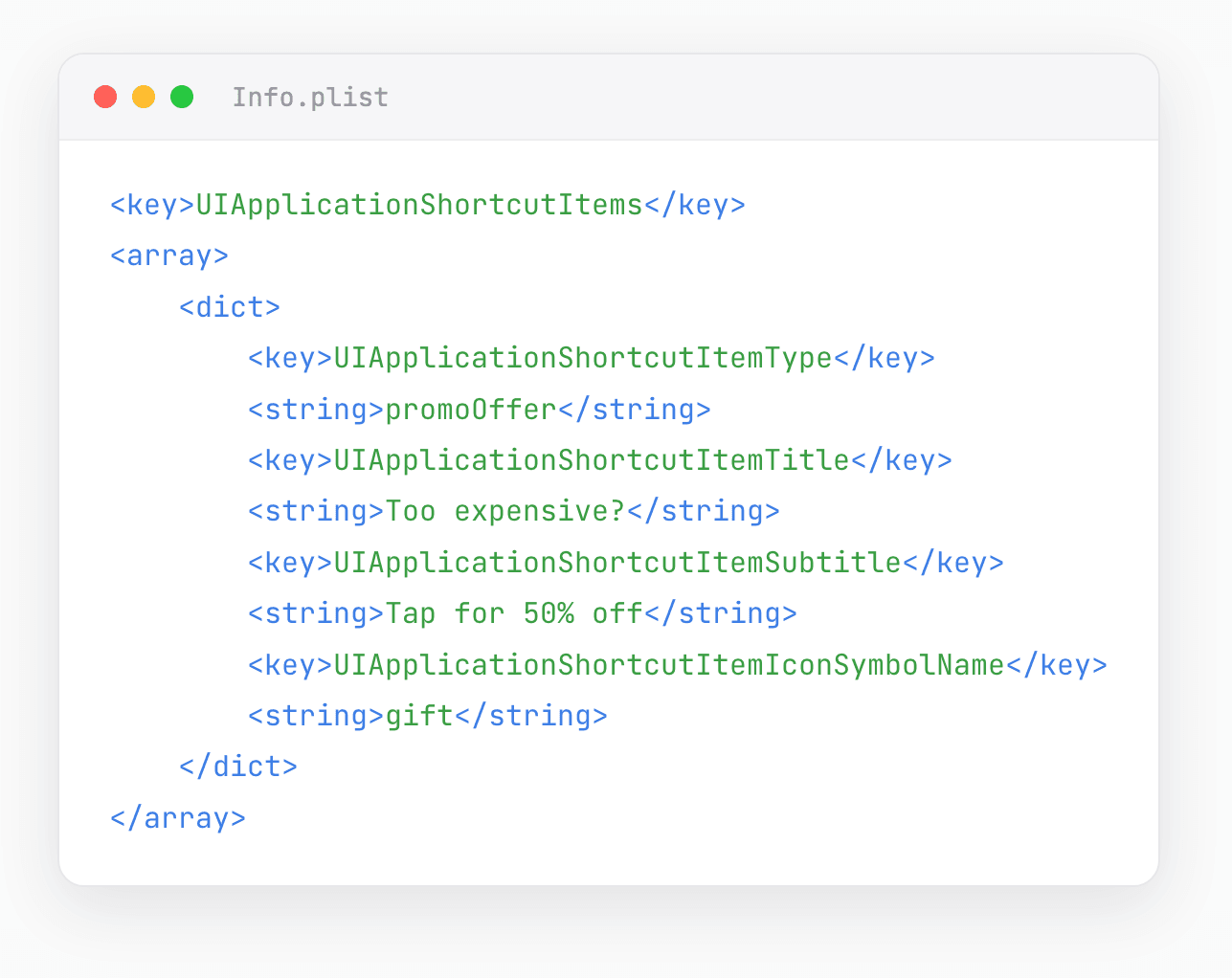
Long-pressing your icon to delete it opens the Quick Actions menu. Put an offer above "Remove App" (max four actions).
Static, in Info.plist
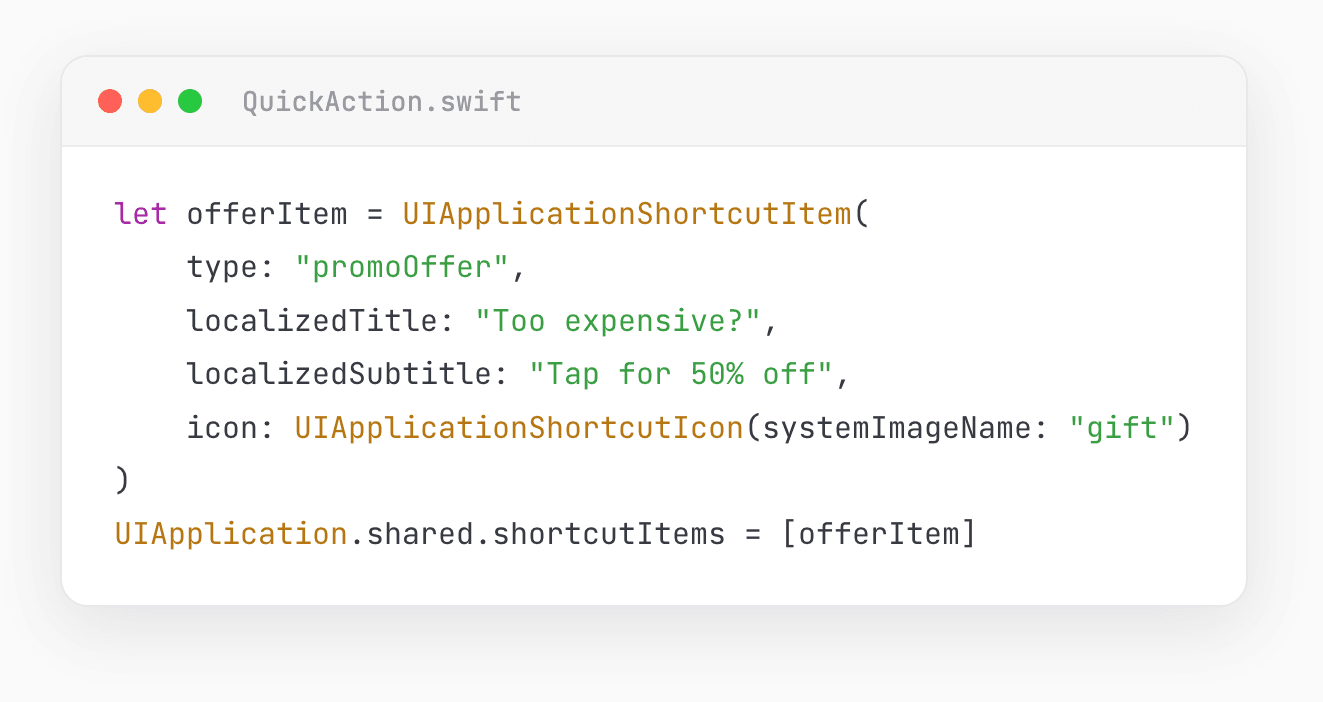
Dynamic (set on background, clear after redemption)
Handle the tap (background and cold launch)
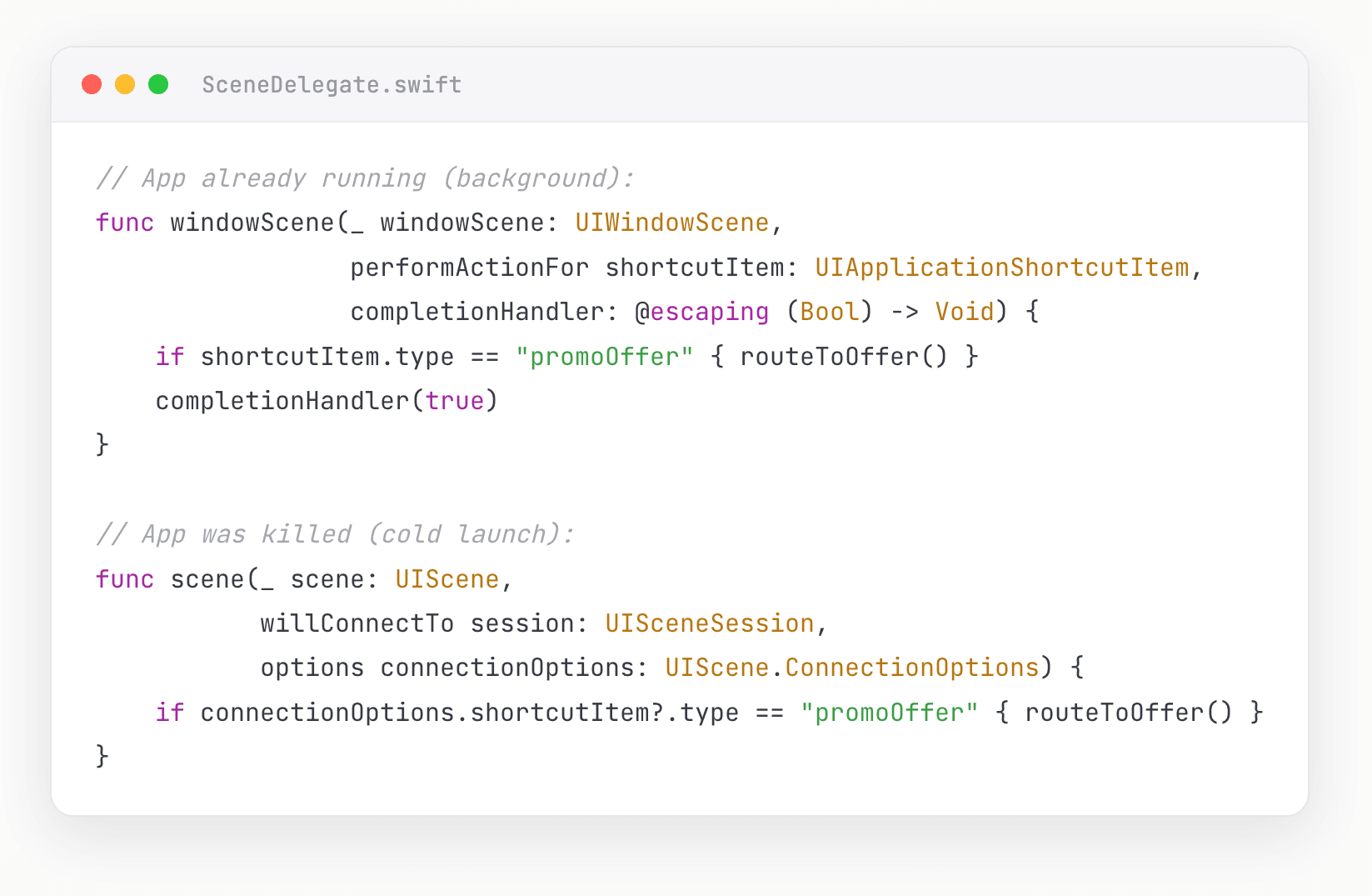
The action only opens the app. Apply the discount via a StoreKit redemption:
- Offer codes (e.g. SAVE50): create the campaign in App Store Connect, then present the redeem sheet. SwiftUI: .offerCodeRedemption(isPresented:). UIKit (iOS 16+): AppStore.presentOfferCodeRedeemSheet(in:). Below iOS 16, open https://apps.apple.com/redeem.
- Promotional offers (signed discount for a lapsed subscriber): sign on your server, purchase with Product.PurchaseOption.promotionalOffer.
Note: the offer-code redeem sheet is known to be flaky in sandbox, so validate the live path.
Test: long-press on a real device to confirm the action sits above "Remove App", tap it from both a cold launch and the background, redeem a sandbox code end to end, and confirm the shortcut clears after redemption.
The ship checklist
Cancel screen: interest form → offer created → message localized (66/144) → mapped to products → (server) endpoint <700 ms with JWS verify + signed offer → App Store Connect default set → sandbox test passed → production live → offerType = 5 in analytics.
Delete menu: shortcut added (offer first) → deep-link screen built → StoreKit redemption wired → cold launch + background handled → sandbox redeem verified → shortcut cleared after redemption.
Before you ship
Retention Messaging is new and gated by the interest form (GA through fall 2026). The cancel-screen message is signal-matched, not reason-matched. The offer-code redeem sheet is flaky in sandbox, so validate the live path.
Sources: Apple WWDC 2026 session 309; Retention Messaging API docs (Get Retention Message endpoint, responding to real-time requests); StoreKit docs (presentOfferCodeRedeemSheet, offer codes, UIApplicationShortcutItem, Add Home Screen quick actions); App Store Server Library (verifyAndDecodeRealtimeRequest).