
Re-engagement: How to Win Back Churned Subscribers
Re-engagement: How to Win Back Churned Subscribers
Most growth teams treat churn as a line on a dashboard, not a moment to act on. That is not monitoring churn. That is watching subscribers you paid to acquire walk out the door in real time, at the exact instant you could still keep them, and doing nothing. Re-engagement fixes that. And the cheapest place to run it is not a campaign next quarter. It is the exit itself.
The math is pushing every team in this direction. Global average CPI rose 18% year over year to $2.24, with iOS at $3.60, and on Apple Ads the average CPA climbed from $2.90 to $3.76, a 30% jump in a single year (CPI Benchmark Report 2025, AppFillip, directional; Apple Ads Search Results Benchmarks Report 2026, SplitMetrics). The cause is structural: building an app got cheap, so more apps ship, the auction gets more crowded, and acquisition gets more expensive every quarter. So the subscriber you already earned is worth defending harder than the one you have not bought yet.
Now look at how many of them you lose. On short trials, 55.4% of cancellations happen on Day 0, within hours of the trial starting, and on Google Play, 32.2% of cancellations are billing failures rather than decisions at all (State of Subscription Apps 2026, RevenueCat). You are hemorrhaging hard-won subscribers at two moments: when they go to cancel the subscription, and when they try to delete the app. This article covers a tactic for each, with the real numbers behind both.
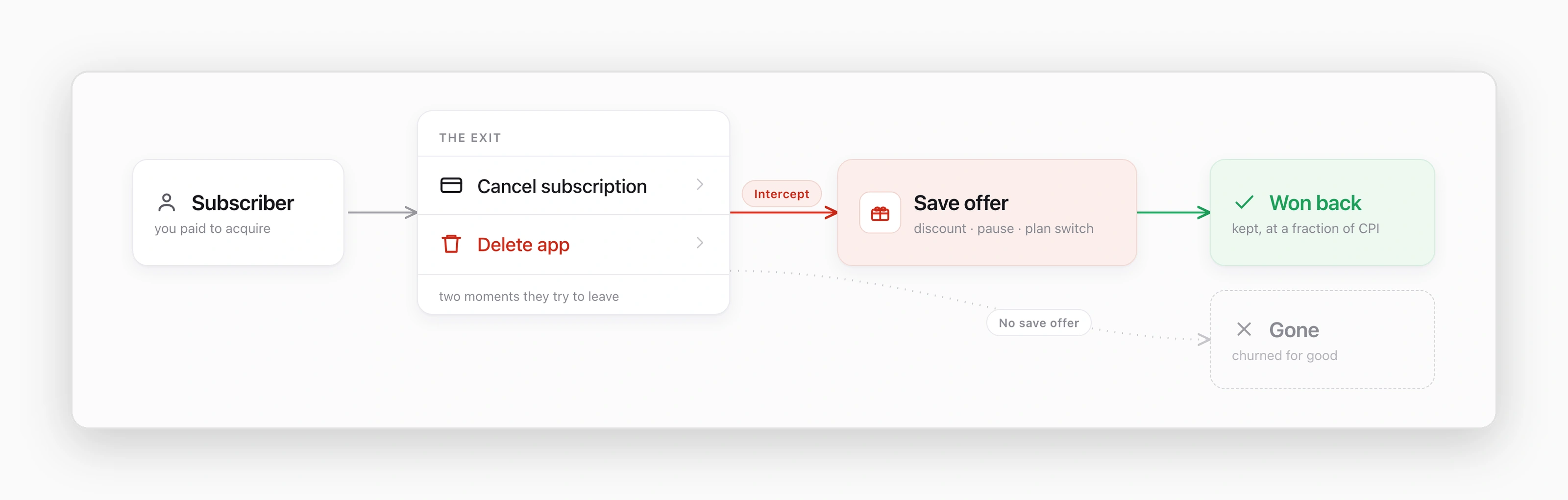
Re-engagement happens at the exit, not in a campaign next quarter
Here is the reframe. Re-engagement is not something you run after a subscriber is gone. It is an offer you place at the exact moment they try to leave.
Re-engagement is the practice of recovering a lapsing or churning subscriber by presenting a targeted offer, such as a discount, a cheaper plan, or a pause option, at the moment of departure. A win-back campaign is the specific offer or sequence used to convert that departing user back into an active subscriber, reducing net subscription churn.
Framed that way, the highest-intent re-engagement surface is not an email sent three days late. It is the two screens iOS shows a user in the act of leaving.
Win back at the cancellation flow with a reason-matched save offer
Put yourself in the subscriber's shoes for a second. You pay for an iOS app, and one day you decide you're done with it. What do you actually do? You open Settings. You tap your name at the top. You tap Subscriptions. You scroll until you find the app. You tap it, then you tap Cancel Subscription. That is the whole path, a few taps and you are out, and for years the developer had no say in any of it.
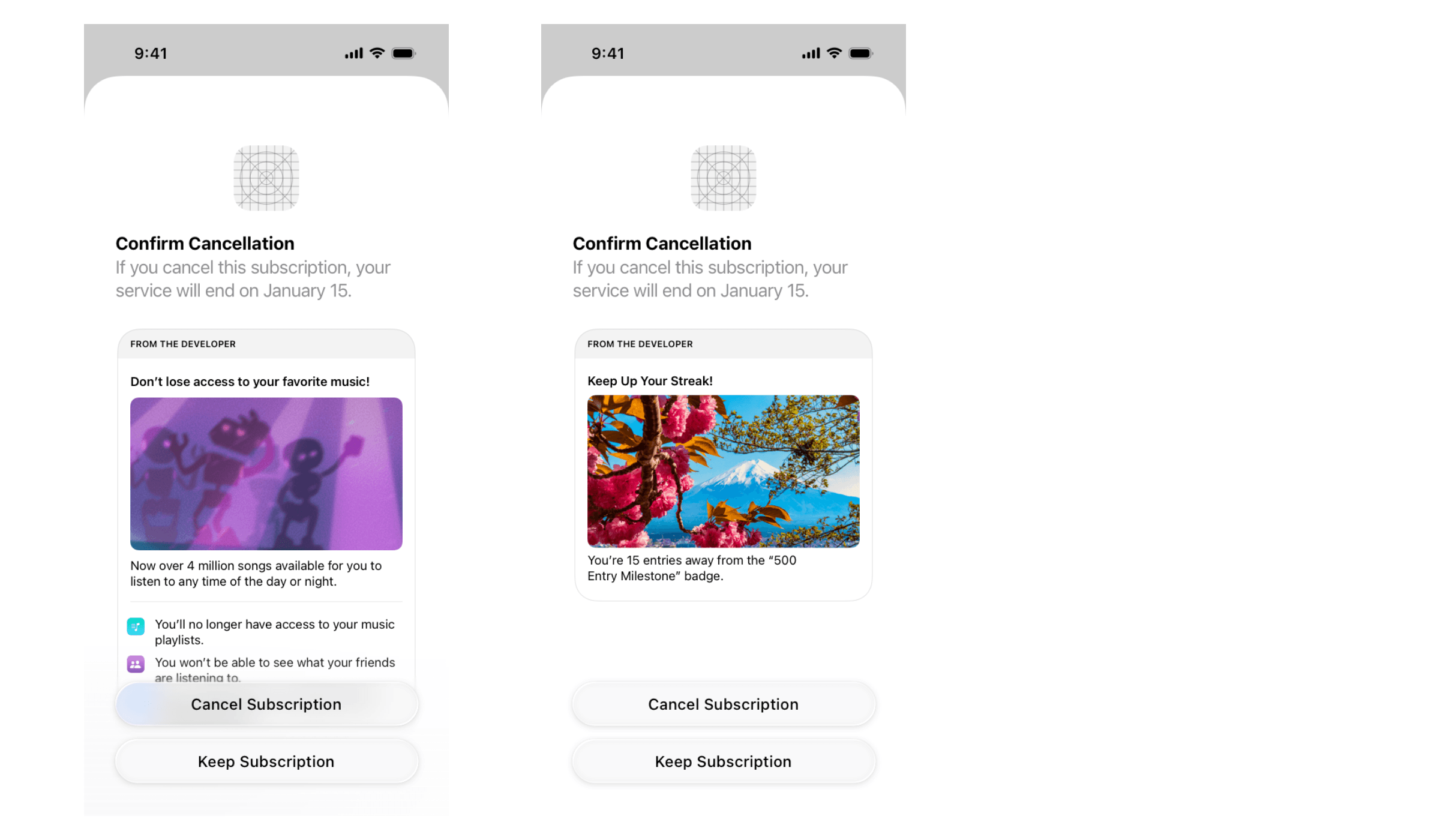
That changed. Apple now lets you show the user a message at that exact moment, right on the cancellation screen inside the global Subscriptions settings, the "From the Developer" block. One slot, one shot, to say something before they confirm. You can do one of three things with it: show a simple static message, show dynamic progress based on where the user is in your app, or put a real offer on the table to talk them out of leaving. Most apps leave the slot empty and let the user walk. The ones that win subscribers back use it, and they use it in one of two ways.
First, you can remind them what they are walking away from. No discount, just the value they are about to lose. One version spells out what goes dark the second they cancel: the playlists, the friends, the thing they actually opened the app for. Another leans on the progress they have already built, "you're 15 entries away from the 500 Entry Milestone." That is loss aversion and streak psychology doing the work, and for habit and content apps it often keeps more people than money would.
Or you can put money, or a better plan, on the table. If the reason is price, a discounted rate keeps them at a number they will accept, "$3.99 per month for the next year." If the reason is the wrong plan, do not discount at all, switch them: "switch to annual and save 23%." Same screen, different lever, each matched to why they are actually leaving.
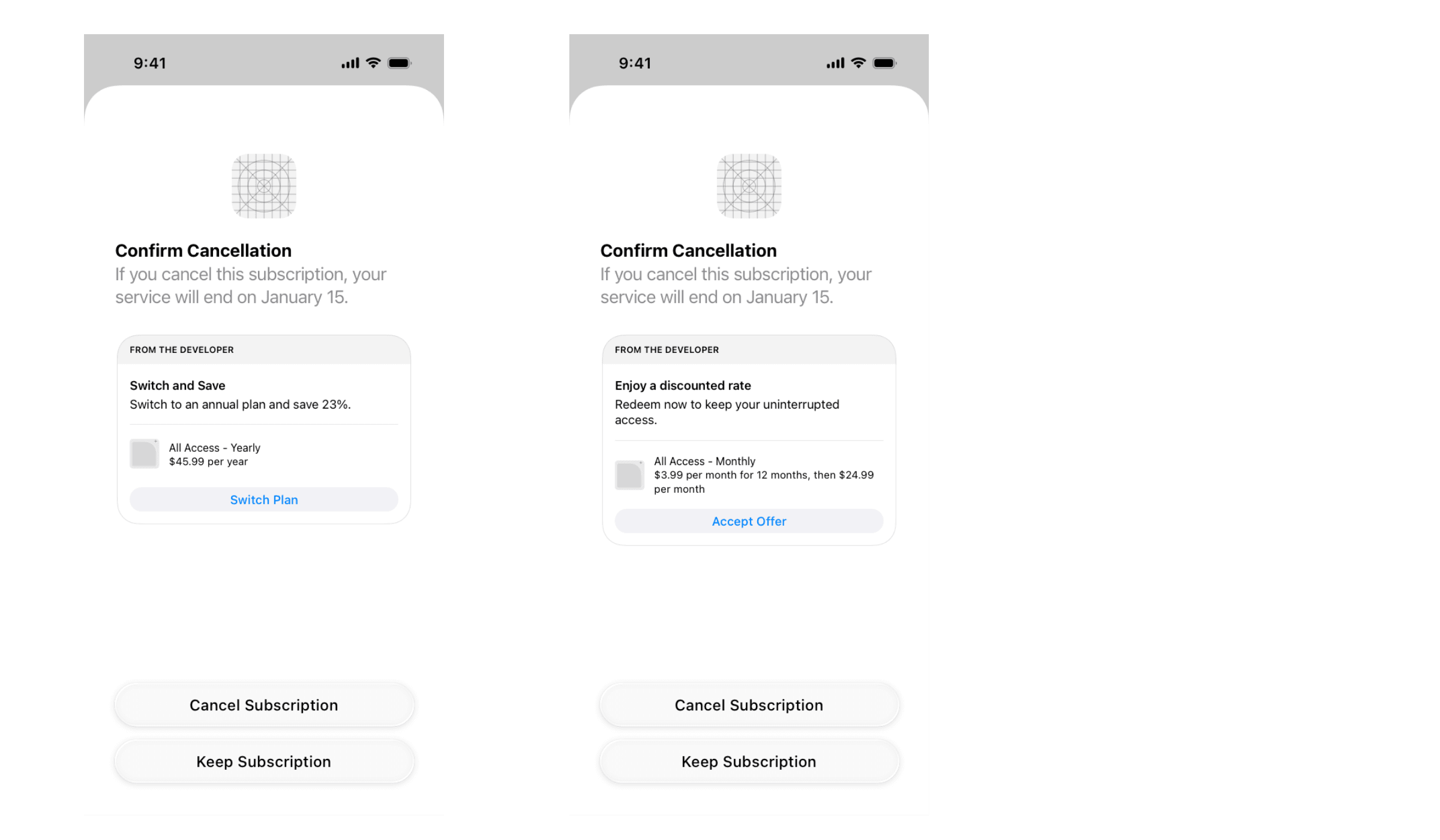
That single slot is your intercept on Apple's turf. The richer play, a full reason-matched save flow that asks why first and then routes each answer to its own offer, you run one step earlier: in-app before you ever hand the user to Apple, or on your own web billing, where you control the whole screen.
A weak save flow throws one blanket discount at everyone. A strong one starts with a short reason-capture step, a single tap on why they are leaving, and routes each reason to the offer most likely to save it. This is the playbook we build:
- “Too expensive” gets a targeted discount or a downgrade to a cheaper plan. Do not lead with your steepest discount; a modest one saves the price-sensitive users without training the rest to cancel for a coupon.
- “Not using it right now” gets a pause or snooze, one to three months, instead of a cancel. The subscription survives; only the billing stops. Seasonal and habit-based apps recover a large share of these because the intent was a break, not a breakup.
- “Didn't get to try it properly” gets an extended trial or a free week. This is the user who churned before they saw the value, so more time, not less money, is the right lever.
- “Wrong plan for me” gets a plan switch: annual to monthly for the commitment-shy, monthly to a discounted annual for the ones who found it too expensive per month.
- "Missing a feature" gets routed to support or a roadmap note, not an offer. Discounting will not fix a product-fit gap, and capturing the reason tells your team what to build.
Two mechanics make this work beyond the offer itself.
First, sequence the offers: show the cheapest-to-you save first (pause, plan switch), and only escalate to a discount if the user declines.
Second, cap and gate the strongest discount so it does not become a self-service price cut for users who would have stayed anyway. The reason-capture step is what lets you do both without guessing.
On the payoff, the report-grade number is clear: 44% of consumers who cancelled a subscription in the past resubscribed to that same service later (State of Subscribers 2024, Recurly). Catching that intent at the cancel screen, rather than hoping it returns on its own, is the entire point of the intercept.
On our own side, here is the pattern we see, stated as ours rather than borrowed. Teams typically lose a large share of trials at the trial-to-paid step, on the order of 50 to 60 points. A working cancellation save flow pulls that loss back meaningfully, toward the 10 to 15 percent range. That is not an external benchmark. It is what we see when a reason-matched save offer is placed in the cancel path and iterated per cohort.
Done well, this is a high-leverage method hiding in plain sight. It requires cohort analysis to know which segment is churning and why, churn prediction to flag churn risk before the tap, and an offer matched to the stated reason. Most teams route their entire subscription churn effort into dunning emails and email re-engagement that arrive after the user is already gone. The cancellation flow catches them while they are still holding the phone.
Win back at app deletion with the Home Screen Quick Actions offer
The second surface sits one gesture away. Picture the same user, except this time they don't open Settings, they just press and hold your icon on the Home Screen to delete it. iOS pops up the little Quick Actions menu, and for most apps it says nothing but "Edit Home Screen" and, in red, "Remove App." But you own the top of that menu. You decide what sits above Remove App, in the half-second before their thumb gets there.
The same levers from the cancel screen work here, matched to why they're leaving. Too expensive gets a discount and a code. Not using it gets a pause. The user who forgot the value gets their progress, or their streak. The frustrated one gets a door to support before they rage-delete. You have room for one or two lines, so you pick the lever that fits your churn.
Simone Canciello put this to work on his sobriety app, Drylendar. Right in the long-press menu, next to "Log Today" and "Assistance," he added one line: "Too expensive? Use code SOBERLIFE50." His pitch was blunt: you lose money every time someone deletes your app, so add a quick action, offer a discount, and you monetize the users who were already walking.
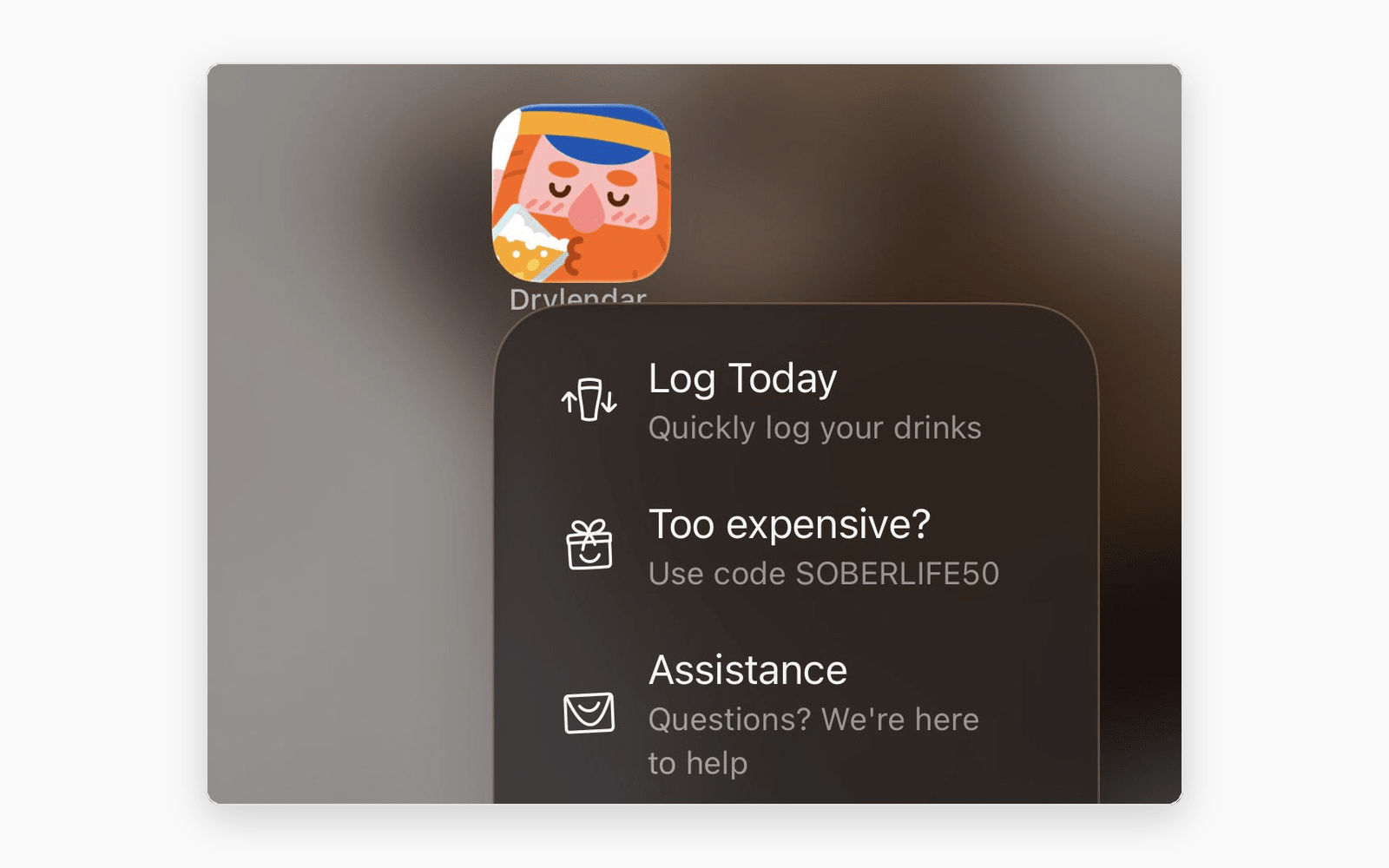
Reference: Simone Canciello's X post.
And it isn't theory. Connor replied with his own receipts: that shortcut offer pulled in roughly $24,223 over a single year, July 2025 to July 2026, from a surface he wasn't paying a cent to reach.
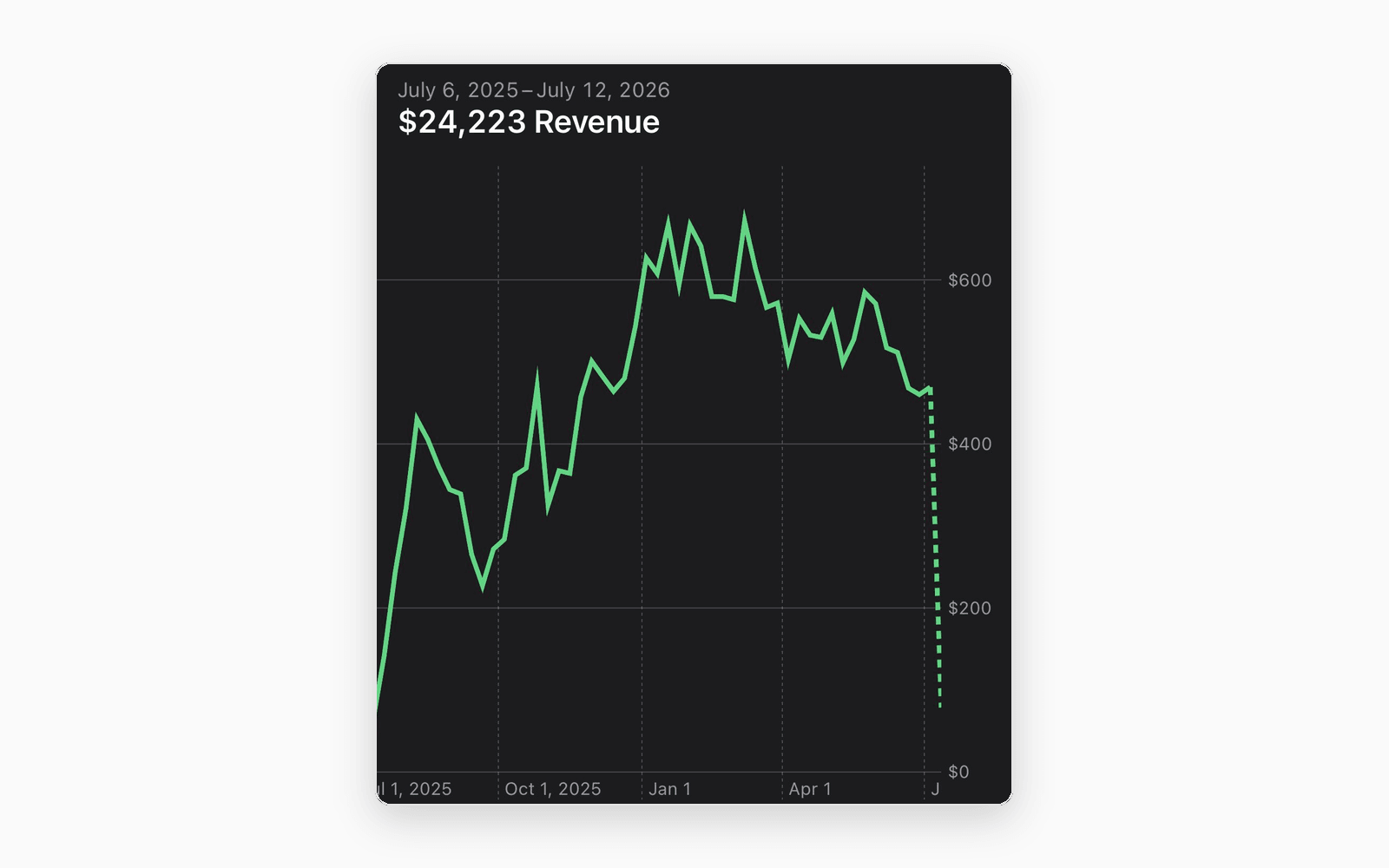
Reference: Connor's X Post
It doesn't have to be a discount, either. Some apps just ask you to stay: "Wait! Don't delete me! We're here to help." Others use the moment to keep the relationship alive after the uninstall. Merge Adventure offers a second chance and a follow on social, so a deleted app still turns into a follower. The lesson holds across all of them: this is the last word, and it's yours to take.
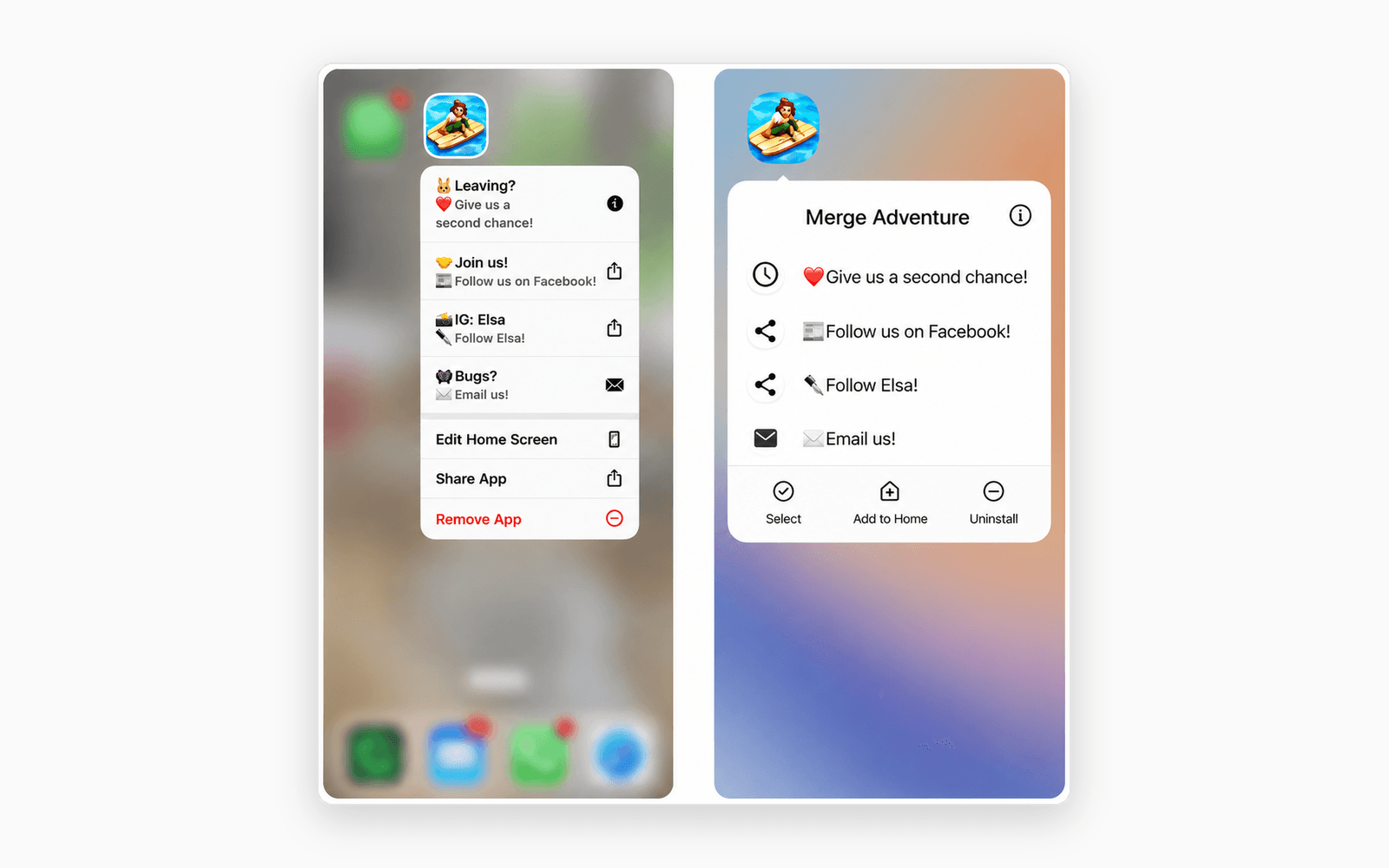
Reference: MAF
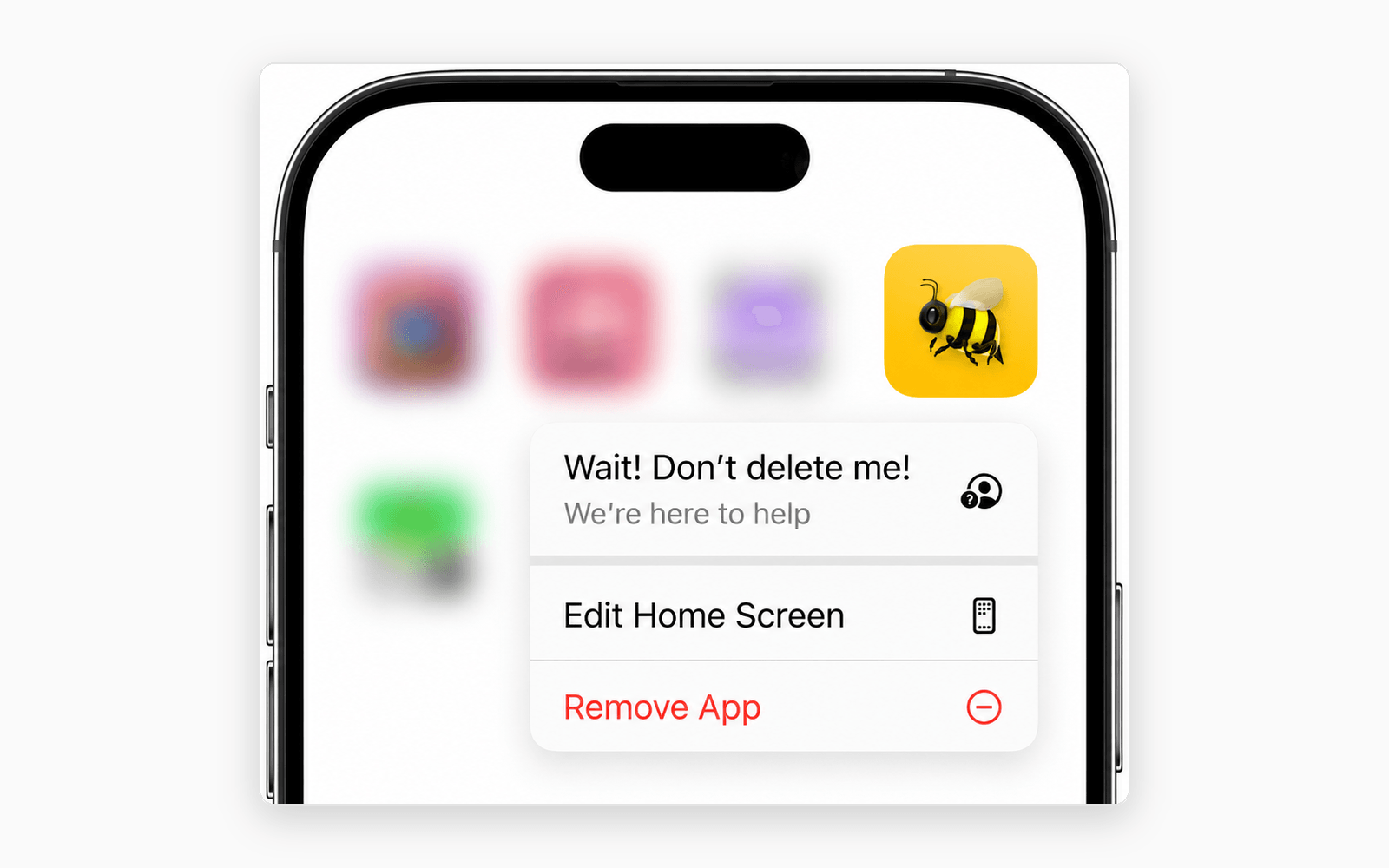
The math here is almost unfair. A user in the delete menu costs you nothing to reach, and they've already churned in their head, so anything you win back is pure upside. Put one line above Remove App and a fraction of them stop, tap it, and stay, or at least leave as a follower instead of a stranger. Connor's five figures in a year came from exactly that, one quick action on a surface most teams never think to touch. Your competitors are letting these users walk in silence. You don't have to.
## FAQ
What is re-engagement?
Re-engagement is the practice of recovering a lapsing or churning subscriber with a targeted offer, such as a discount, cheaper plan, or pause, delivered at the moment of departure. Unlike a broad email blast, exit-based re-engagement meets the user at the highest-intent moment: when they try to cancel the subscription or delete the app.
What is a win-back campaign?
A win-back campaign is the specific offer or sequence used to convert a departing or lapsed subscriber back into an active one. It can run at the exit (a cancellation-flow save offer, a delete-moment quick action) or after the fact (email re-engagement, dunning emails for failed payments).
Does intercepting the cancellation flow actually work?
Yes. 44% of consumers who cancelled a subscription later resubscribed to the same service (Recurly, 2024), so the intent to return is common. Catching it at the cancel screen with a reason-matched save offer captures that intent instead of leaving it to chance. In our own work, adding a save flow to the cancel path pulls trial-to-paid loss back from the 50 to 60 point range toward 10 to 15 points lost.
How do you win back a user at app deletion on iOS?
Add a Home Screen Quick Action to your app. When the user long-presses the icon to delete it, the menu can surface a discount offer with a promo code, a quick-use action, and a support link. Indie builders have reported this recovering thousands in revenue from users who had already decided to leave.
The subscriber you win back is cheaper than the one you buy.
Every install now costs more than it did a year ago, and half your trial cancellations happen in the first day. The subscriber you win back at the exit is cheaper than the one you buy, but only if you are standing at the exit when they reach it. Most teams are not. This is where OWA AI's Insights Engine earns its place: it watches your retention and subscription metrics, flags the lapsing cohort before you would catch it, connects your RevenueCat and paywall data so recovered revenue is visible by cohort, and helps you iterate the offer per segment.
Want to see which cohort you are losing at the exit right now, and what a save flow would recover?
That is a conversation worth having, sign up or book a call with us.